
Design once, run continuously. Connect your tools, data, and AI into automated business flows — from document routing to approval chains, from data extraction to multi-system updates. The work that used to fill your team's calendar now runs on its own.
.png)
.png)
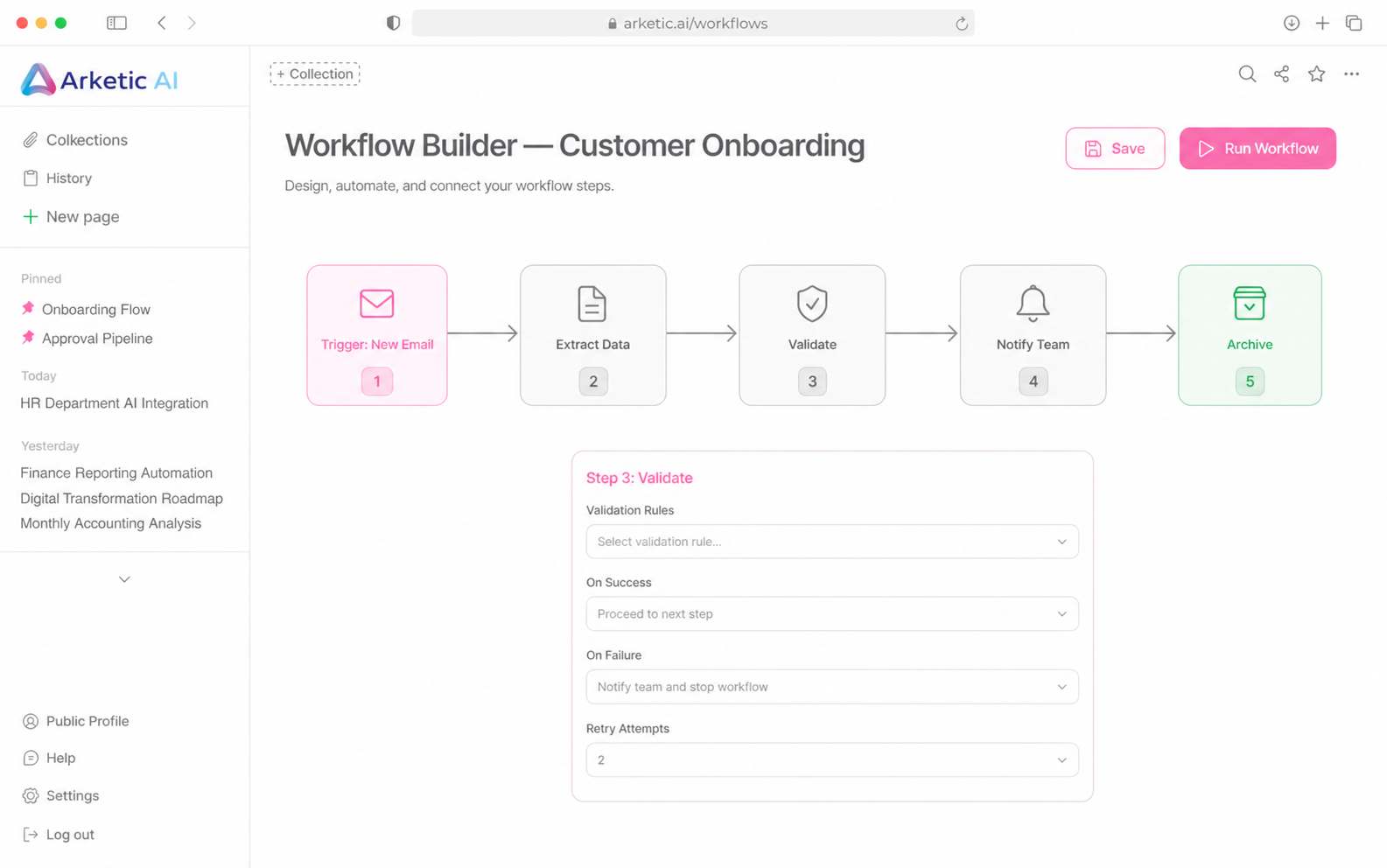
Drag, drop, connect. Workflows designs your business logic visually — triggers, actions, conditions, and approvals laid out in a clear flow diagram. Your operations team can build and modify automations without waiting for engineering. What you see is exactly what runs.

Workflows don't wait for someone to press a button. Trigger automatically on incoming emails, form submissions, scheduled times, API webhooks, database changes, or events from any connected system. The right work starts at the right moment — automatically, every time.
.png)
.png)

Workflows orchestrate work across systems, departments, and approval layers. Extract data from incoming documents, validate it against your records, route it to the right approvers, update your databases, and notify stakeholders — all in a single connected flow. No manual handoffs, no dropped tasks, no lost context.


Workflows are deterministic — you design the exact path, conditions, and steps in advance. They run the same way every time. Agents are adaptive — they decide their own steps based on a goal. Use workflows for predictable, repeatable processes (invoice routing, onboarding, compliance checks). Use agents for tasks where the path isn't fixed and judgment is needed.
Workflows are designed for operations and business teams, not just engineers. With the visual builder, your finance, HR, or operations leads can design and modify their own automations using drag-and-drop. Your IT team handles the initial setup, integrations, and access permissions. If you need help building a complex workflow, our team can configure it for you on request.
Yes. Connect your internal documents, policies, and knowledge bases. The assistant grounds every answer in your data with citations and traceable sources, and updates automatically as your knowledge evolves.
Workflows include built-in error handling. You can configure retry rules, fallback paths, and alert notifications for failures. Every step is logged with full context, so when something fails the audit trail shows exactly where, why, and what state the data was in. Failed runs can be inspected, fixed, and resumed without starting over.
Yes. Any workflow step can require human approval before continuing. Configure who approves what, set escalation rules for delayed responses, and track approval history per run. Workflows pause cleanly at approval steps and resume the moment a decision is made — across email, Slack, or the Arketic dashboard.

%20(184%20x%2044%20piksel).svg)